A workshop stemming from my Lab.
Pre-workshop Setup
We’ll be using docker compose and git. Compose will make your life easier in the future; you can manage all your containers in one file. Git for a GitOps workshop will be important. I’ll explain both Compose and Git in the workshop, but I assume some familiarity (particularly with Git).
Install Git
sudo apt update && sudo apt install -y git
git --version
Install Docker Compose
# dependencies
sudo apt install -y ca-certificates curl gnupg

# Docker's official GPG key and repo
sudo install -m 0755 -d /etc/apt/keyrings
curl -fsSL https://download.docker.com/linux/ubuntu/gpg | sudo gpg --dearmor -o /etc/apt/keyrings/docker.gpg
sudo chmod a+r /etc/apt/keyrings/docker.gpg

echo "deb [arch=$(dpkg --print-architecture) signed-by=/etc/apt/keyrings/docker.gpg] \
  https://download.docker.com/linux/ubuntu $(. /etc/os-release && echo "$VERSION_CODENAME") stable" | \
  sudo tee /etc/apt/sources.list.d/docker.list > /dev/null

# Docker Engine + Compose plugin
sudo apt update && sudo apt install -y docker-ce docker-ce-cli containerd.io docker-compose-plugin

# verify
docker --version
docker compose version
Note on VMs
I’m assuming you’re using ubuntu VMs. Debian works; just swap
ubuntufordebianin the repo URL and useVERSION_CODENAMEaccordingly.
Architecture Overview
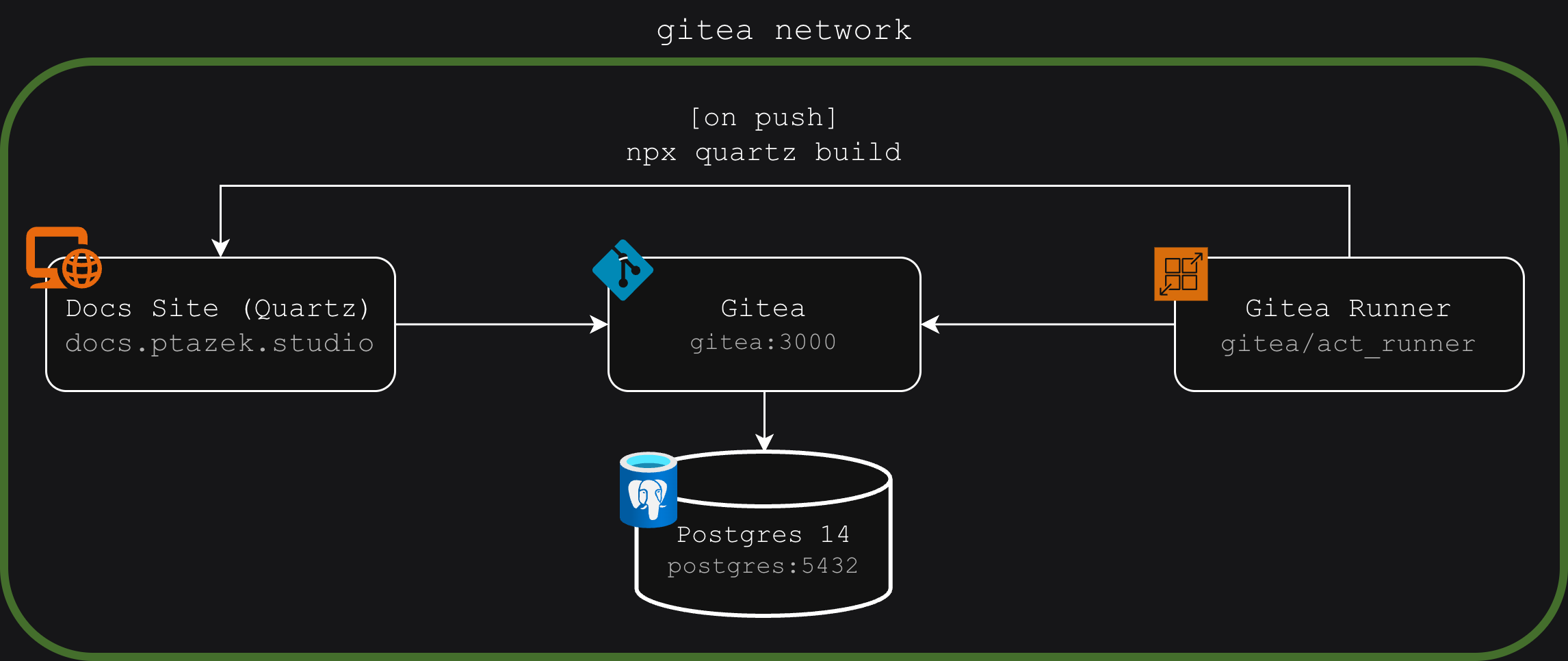
Gitea Setup
As a home-labber I’m apparently allergic to trusting cloud services. Thus I landed on self-hosted Gitea:
services:
  gitea:
    image: docker.gitea.com/gitea:1.25.5
    container_name: gitea
    environment:
      - USER_UID=1000
      - USER_GID=1000
      - GITEA__database__DB_TYPE=postgres
      - GITEA__database__HOST=postgres:5432
      - GITEA__database__NAME=gitea
      - GITEA__database__USER=gitea
      - GITEA__database__PASSWD=gitea
    restart: always
    networks:
      - gitea
    volumes:
      - gitea:/data
      - /etc/timezone:/etc/timezone:ro
      - /etc/localtime:/etc/localtime:ro
    ports:
      - "3000:3000"
      - "222:22"
    depends_on:
      - postgres

  postgres:
    image: docker.io/library/postgres:14
    container_name: postgres
    restart: always
    environment:
      - POSTGRES_USER=gitea
      - POSTGRES_PASSWORD=gitea
      - POSTGRES_DB=gitea
    networks:
      - gitea
    volumes:
      - ./postgres:/var/lib/postgresql/data

networks:
  gitea:
    name: gitea
    external: false

volumes:
  gitea:
    driver: local
And after a docker compose up you’ll see the Gitea web UI at http://server-ip:3000. Finish the installation there.
Create a repo via the web UI. Then Initialize it locally:
git init
git branch -M main

# to cache your credentials for future pushes
git config --global credential.helper store

# add ALL private files like .env or .ssh_keys; also include postgres/
nano .gitignore

git add .
git commit -m "Initial commit"

# fill in your details!!
git remote add origin http://your-username:GITEA_TOKEN@your-server-ip:3000/your-username/repo-name.git

git push -u origin main
Creating a Gitea token
Go to User Settings ⇒ Applications. Enter a “Token Name,” select Read/Write for repositories, and click Generate Token.
Quartz 4 Docs Site
We can create documentation using Markdown via Obsidian (or any editor). This lets you link docs together and explore them interactively like this ⇒ GitOps Workshop.
To do this, setup the Compose config:
docs:
    build: ./docs
    container_name: docs
    environment:
      GIT_REPO:  "http://your-username:DOCS_GITEA_TOKEN@your-server-ip:3000/your-username/repo-name.git"
    networks:
      - gitea # the same internal docker network that gitea & postgres/SQLite are on
	ports:
	  - "80:80" # you may need a different host port if 80 is already taken
    volumes:
      - ./docs/quartz/content:/vault:ro
      - ./docs/quartz:/usr/src/app/quartz
    restart: unless-stopped
In your docs directory, you’ll need this Dockerfile to build from1.
FROM shommey/dockerized-quartz:latest

# Update to Node.js 22
RUN apt-get update && \
    apt-get install -y curl && \
    curl -fsSL https://deb.nodesource.com/setup_22.x | bash - && \
    apt-get install -y nodejs && \
    apt-get clean && \
    rm -rf /var/lib/apt/lists/* && \
    node --version && \
    npm --version
After creating another Git repo for the docs site, initialize the Quartz boilerplate:
# remove docs/ from the main repo tracking
nano .gitignore

# in /docs/quartz
git clone https://github.com/jackyzha0/quartz.git .
git branch -M main

# node must be >= v22; npm >= v10.9.2
curl -o- https://raw.githubusercontent.com/nvm-sh/nvm/v0.39.7/install.sh | bash
source ~/.bashrc

# initialize Quartz repo
npm i
npx quartz create

git remote set-url origin http://your-username:GITEA_TOKEN@your-server-ip:3000/your-username/docs-repo-name.git

git push -u origin main
And after a build, you should see a Quartz template site at http://server-ip:80. But it doesn’t help if theres no documentation there… You can write markdown files at docs/vault/content — and if you’re patient, a manual restart will serve the files.
What to do if you’re not patient
Setup CI/CD. Lets create a gitea-runner that automatically rebuilds the docs site on repo push:
 gitea-runner:
    container_name: gitea-runner
    image: gitea/act_runner
    environment:
      - GITEA_INSTANCE_URL=http://gitea:3000
      - GITEA_RUNNER_REGISTRATION_TOKEN=PASTE_TOKEN_HERE
    networks:
      - gitea
    volumes:
      - /var/run/docker.sock:/var/run/docker.sock
      - ./gitea-runner/config.yaml:/config.yaml
    depends_on:
      - gitea
Registering a Gitea Runner
Go to Repository Settings ⇒ Actions ⇒ Runners. Copy and paste the Registration Token under Create new Runner.
In the gitea-runner directory, we need to generate a default config for job containers that the runner spawns:
docker run --rm --entrypoint="" gitea/act_runner act_runner generate-config > config.yamlThen add this to the config.yaml so they can reach the gitea network:
container:
  network: "gitea"
With that set, we can create the workflow file at .github/workflows/deploy-docs.yaml:
on:
  push:
    branches: [main] # when pushed to main
jobs:
  deploy:
    runs-on: ubuntu-latest
    steps:
      - run: docker exec docs sh -c "cd /usr/src/app/quartz && git pull && npx quartz build --directory /vault --output /usr/share/nginx/html"
		# cd into the quartz dir --> pull changes --> build new site
After running docker compose up for the runner, any .md files pushed to docs/vault/content will appear on your docs site almost instantly.
Footnotes
-
Made possible by shommey’s dockerized-quartz↩︎ ↩